
Section 10 · Running the System
10Email Administration
Beyond each rep's own signature and sending window, an owner controls the organization-wide email settings — tracking, sending policy, compliance, and deliverability. These protect your domain's reputation and keep your outreach lawful. They live at the bottom of Settings → Email and are visible only to an Owner.
One principle ties it together
Almost every control here gates automated sends — sequences and scheduled messages — only. A rep's immediate, one-to-one email always goes out. These settings shape the machine, not the personal note.
Organization tracking
Turn open and click tracking on or off for the whole team. Opens use an invisible pixel; clicks rewrite links. The first time you enable it, you accept a short notice acknowledging that tracking can affect deliverability and must be used lawfully. Off by default — turn it on only if your team wants the visibility and accepts the trade-off.
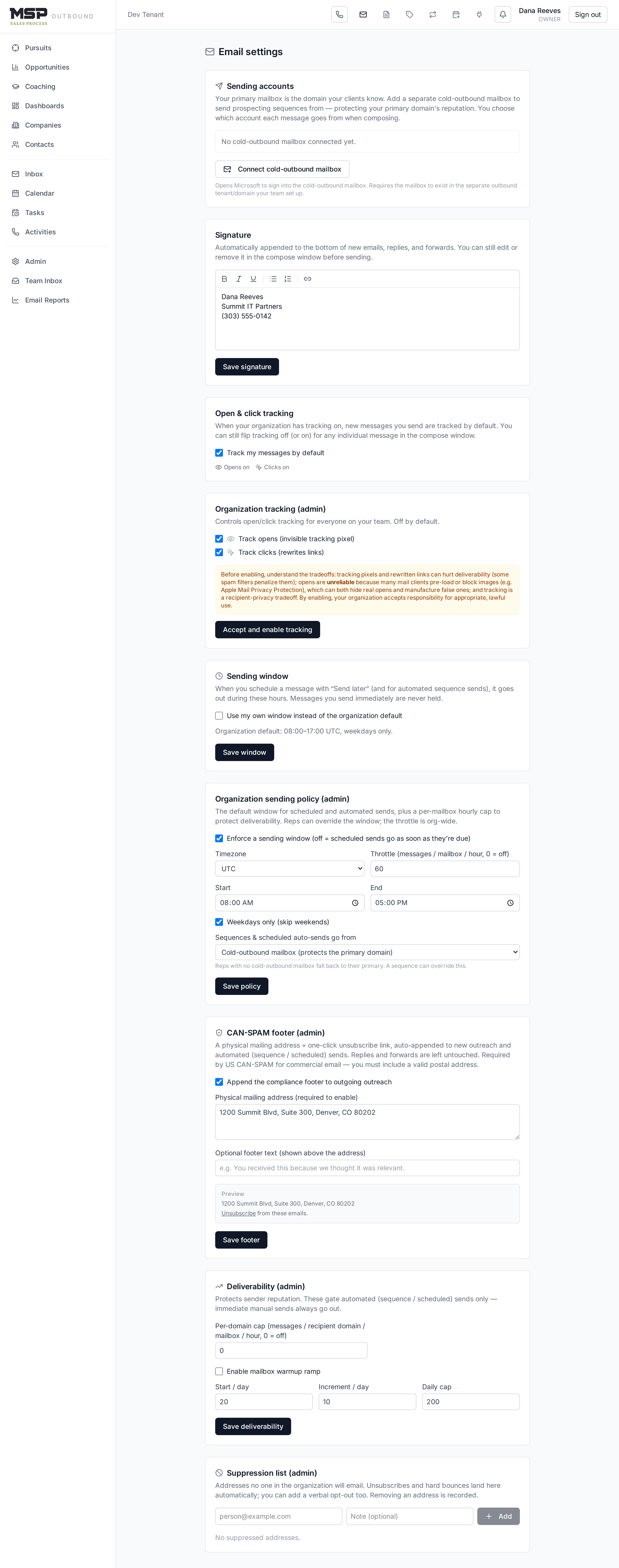
Figure 10.1The admin panels on Settings → Email. Visible only to an Owner.
Sending policy
- Organization sending window — the hours during which scheduled and sequence sends go out. Reps can set their own window within this.
- Throttle — a cap on messages per mailbox per hour, so automated sending stays human-paced.
- Automation send-from — whether sequences and scheduled sends go from each rep's cold-outbound mailbox (protecting your primary domain) or their primary mailbox.
Compliance footer
Enable a CAN-SPAM footer — a physical mailing address plus a one-click unsubscribe link — appended automatically to outreach and automated sends (never to plain replies or forwards). You must supply a physical address to turn it on; US law requires it. This is the guardrail that keeps cold outreach lawful.
Deliverability & warmup
- Per-domain cap — limits how many messages go to one recipient domain per mailbox per hour.
- Mailbox warmup — ramps up a new sending mailbox's daily volume gradually, so a fresh cold-outbound domain builds reputation instead of getting flagged. A status table shows each mailbox's recent volume against its ramp.
Suppression & bounces
The suppression list is the set of addresses no one in the organization will email. Unsubscribes and hard bounces land here automatically; you can also add a verbal opt-out. Removing an address is recorded. A recent bounces panel shows delivery problems detected during mail sync — hard bounces are suppressed automatically; soft bounces are informational.
Why this matters
Deliverability is the difference between outreach that lands and outreach that vanishes into spam folders. The method's cold-outbound play depends on your domain staying trusted — these settings are how you protect it. Set the compliance footer and a sensible throttle before your team runs sequences at volume.
The bottom line
Shape the machine; protect the domain.
Tracking, windows, throttles, compliance, and warmup all guard your sender reputation and keep automated outreach lawful — while your reps' personal emails always fly free.