
Section 06 · The Trailhead in the CRM
06Pursuits & the Plays
A pursuit is one organized attempt to turn an account into a booked appointment. A play is the recipe you run during that pursuit — the sequence of steps proven to work for a particular situation. The CRM ships all ten plays from the Playbook Manual, walks you through each step, and quietly tracks your progress. This section shows you how to run the right play on every account.
Pursuit, play, opportunity — how they fit
Think of it as a chain:
- A pursuit is your run at an account before the appointment — "Attempt #1 on this company."
- A play is the method you follow during that pursuit (Cold Outbound, Referral, and so on).
- When the FTA books, the pursuit converts and an opportunity (the deal) is created. That's Section 09.
The ten plays
Six plays are for winning new logos (the Sales Executive's work); four are for growing and keeping existing clients (the Account Manager's work). Run the one that matches the situation.
| Play | Use it when |
|---|---|
| Cold Outbound | Your default engine. A plausible fit, not yet qualified, no better play running. |
| LinkedIn Nurture | A Qualified Prospect who's active on LinkedIn. Warm them socially — and keep dialing. |
| Shake Loose | Last resort after ~5 failed decision-maker attempts and every other channel exhausted. |
| Tradeshow Leads | A lead from an event — handled on a hot or cold track depending on how warm it is. |
| Web Form / Inbound | Someone reached out. Respond fast — but inbound is warmer, not exempt from qualification. |
| Referral Generation | A targeted introduction from a healthy client into a specific prospect. |
| Play | Use it when |
|---|---|
| New Logo Sales Process | Runs the deal itself after the FTA. Enrolls automatically when you book the appointment. |
| vCIO / AM Cadence | The steady rhythm on every active client: annual plan, monthly presence, quarterly review. |
| Existing-Customer Opportunity | A new purchase or project from a current client — handled as routine or major. |
| Retention Mode | An account under strain. Stabilize first; no referral asks here. |
Enrolling in a play
You can enroll a company in a play from the Companies list (select it, then Enroll in play) or from a pursuit. Once enrolled, the play appears as a panel on the pursuit or company with its steps laid out.
Running a play, step by step
The play panel shows the numbered steps, a checklist for the current step, and clear guidance on how to run it. As you finish a step, click Mark step done and the play advances. Some steps complete themselves — for example, the "Book the FTA" step ticks off automatically the moment the appointment is booked.
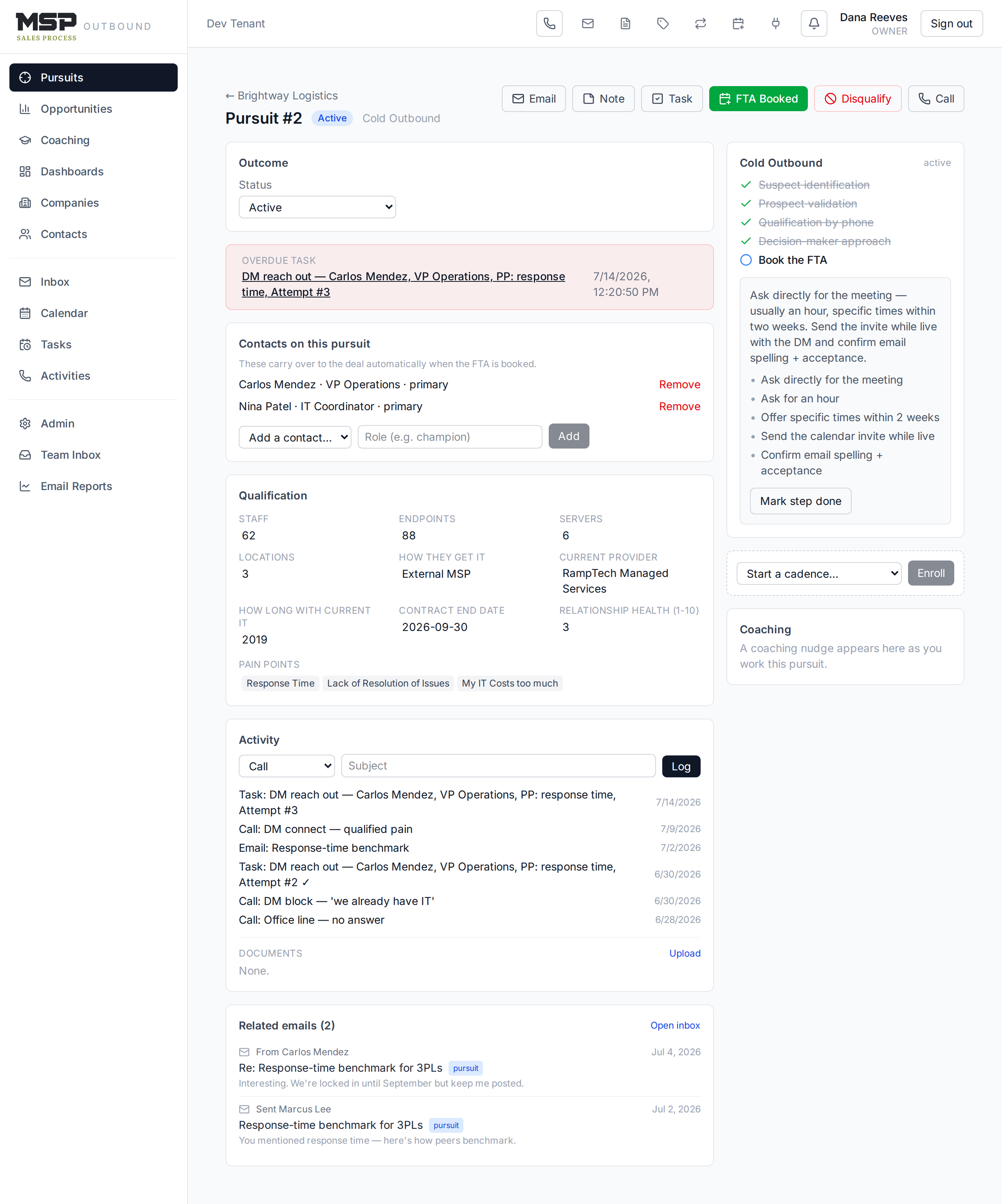
Figure 6.1The Cold Outbound play on a pursuit. The current step shows its checklist; finished steps are ticked.
Routing recommendations — the CRM suggests the next play
The system watches your activity and, when a pattern emerges, offers a one-click suggestion to switch plays — shown as an amber card on the pursuit. For example, after several failed attempts to reach the decision maker on the office line, it may recommend moving the account into Shake Loose. If a LinkedIn nurture goes quiet for five business days, it may suggest returning to Cold Outbound. Each recommendation has an accept button and a dismiss button.
Good to know
Recommendations are advice, never automatic. You're always the one who decides to switch a play. The counter that triggers the Shake Loose suggestion only counts genuine decision-maker attempts on the office line — cell attempts and gatekeeper no-answers don't inflate it.
Sequences: a play with a clock
A sequence (or cadence) is a special kind of play whose steps fire on a timer — send this template, wait three business days, then nudge me if there's still no reply. You enroll a pursuit in a sequence from its page. Sequences are covered fully in Section 10, Email; the important thing here is that a reply — or any logged call or meeting — stops the cadence automatically, so you never keep chasing someone who already answered.
The pursuit record
Open a pursuit to see its outcome status, the contacts you're working (these carry over to the deal automatically when the FTA books), its activity, and its play panel. From here you also get the FTA Booked and Disqualify buttons for when the attempt reaches its conclusion.
The bottom line
Right play, run in order.
Pick the play that fits the situation, work its steps, and let the CRM track progress and flag when a different play would serve you better. The plays are the method's muscle memory, built into the tool.