
Section 12 · The Climb
12Tasks, Notes & Activity Logging
This is the habit the whole system rests on: if it isn't in your CRM, it didn't happen. Logging your work and scheduling the next touch is what turns scattered effort into a climb you can see. This section covers logging activities, writing notes, and managing tasks — including the follow-up rule of three, built right into the flow.
If it isn't in your CRM, it didn't happen. The CRM is your system of record — you live and die in it.
Sales Rep Intensive — Discipline & Mindset
Logging an activity
Every meaningful touch is an activity: a call, an email, a meeting, a note, or a LinkedIn message. Log one from the Activity tab on a company (or with the Note / Call buttons in the header). Pick the type, add a subject and notes, and relate it to the right deal or pursuit — the CRM defaults to the most recent open one, which is usually correct.
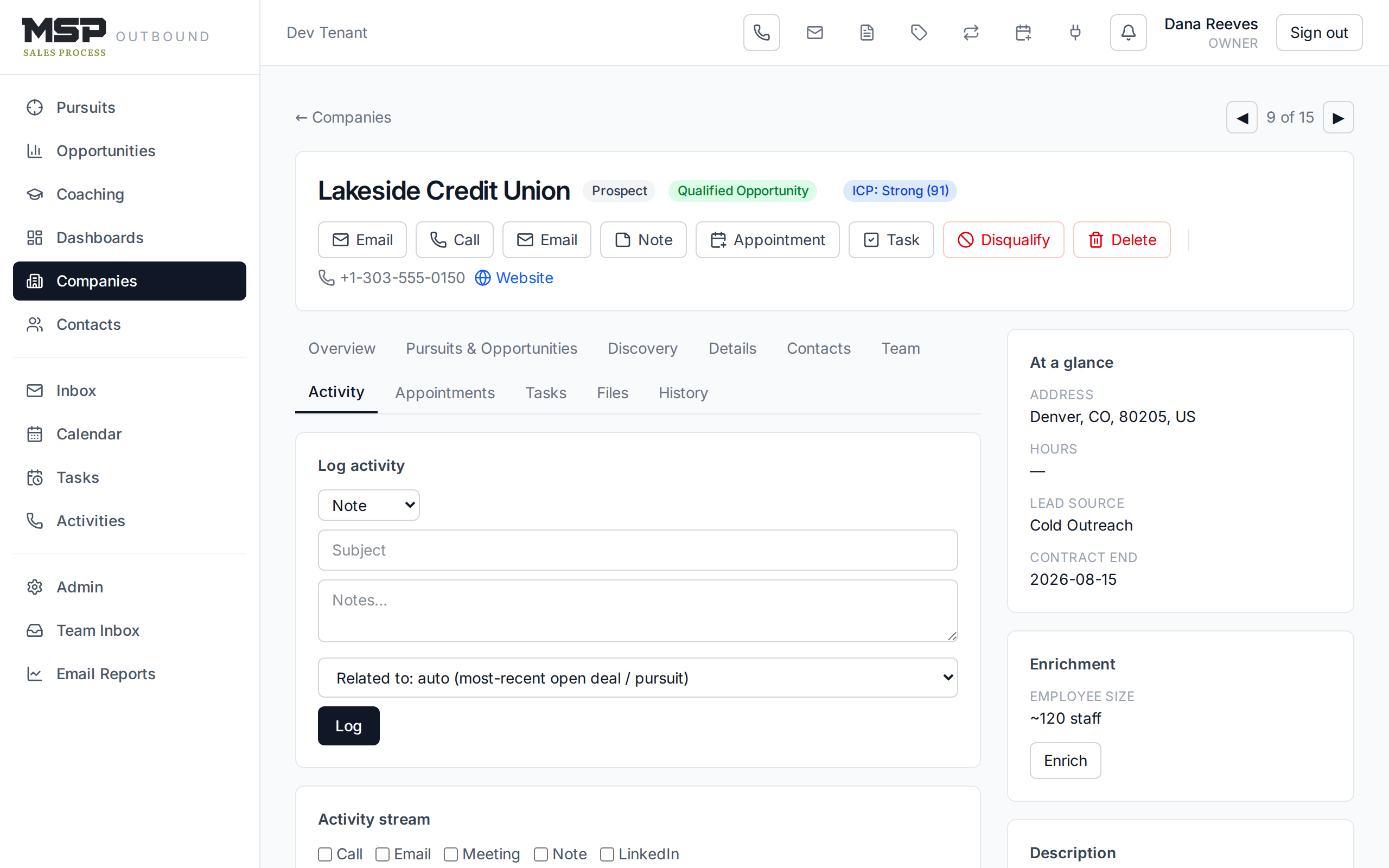
Figure 12.1The Activity tab. Calls add disposition and block-tracker fields; the stream below is filterable.
Good to know
Calls logged through the dialer (Section 07) already capture the disposition, block tracker, duration, and recording for you — you don't re-log them here. Use the Activity tab's log form for touches that didn't go through the dialer, like a note after a meeting or a LinkedIn reply.
Notes — bullets, not novels
A note is just an activity of type Note. Write in bullets, using the abbreviations from your Field Guide — no Dickensian novels. If you have an AI-generated transcript from a meeting, there's a place to paste it: click + Add AI transcript in the note window and drop it in alongside your own summary.
Tasks and the follow-up rule of three
A task is a scheduled next touch. Create one with + New task on a company (or from a deal or pursuit): give it a title, a type, a due date, and an assignee. Open tasks show on the account and in your Tasks list, where overdue ones are flagged in red.
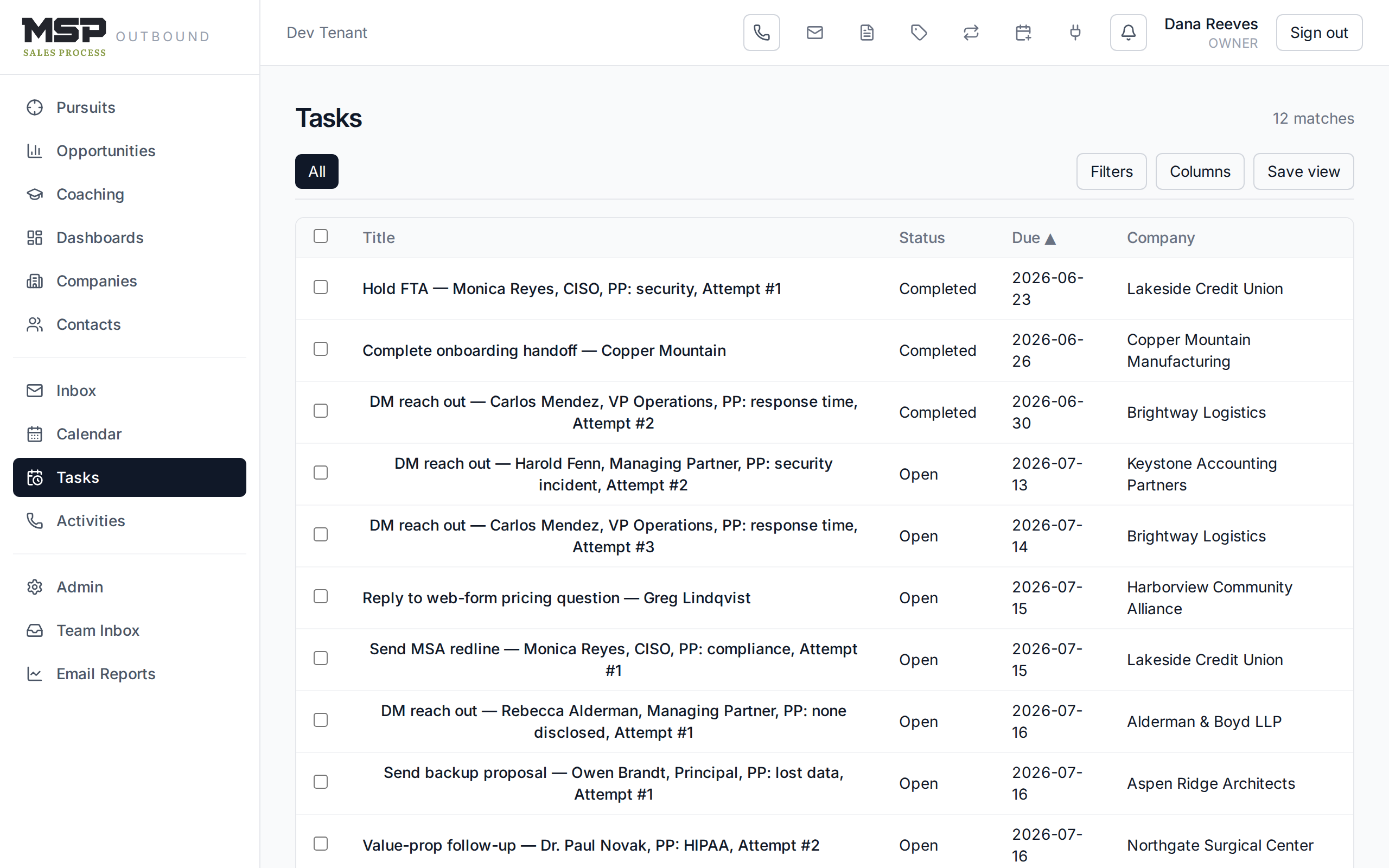
Figure 12.2Your Tasks list. Overdue is red, due-today is amber — work them top to bottom.
The method in the tool
Write tasks the way the Intensive taught, so your future self calls prepared: who to reach, their role, whether you've spoken, the pain point, and the attempt number — for example, "DM reach out — Dana Ruiz, Ops Mgr, never spoken, PP: response time, Attempt #3." And set the due date by the rule of three — threes all the way down: no human reached → 3 days; talked to a human → 3 weeks; timing or nurture → 3 months.
The follow-up prompt
The CRM nudges you to keep the chain unbroken. Right after you log an activity, it offers to create a follow-up task, pre-filled and ready — a small dialog reading "Logged. Schedule the next touch while it's fresh." with the task title and due date already set. Take it. A logged call with no next task is a dropped thread.
Files
The Files tab on a company holds documents — proposals, contracts, signed agreements. Upload with Upload file; preview or download any file; and delete moves it to the recycle bin like everything else.
The bottom line
Log it, then schedule the next touch.
Two habits carry the whole system: record what happened, and set the next task before you move on. Do them every time and no account ever falls through the cracks.