
Section 08 · The Trailhead in the CRM
08Booking the FTA
The First-Time Appointment is the summit of the Trailhead — the single event that turns a Qualified Prospect into a Qualified Opportunity and starts the real selling. The CRM's booking form is built around the Fox & Crow appointment-setting method, step for step, so filling it in honestly means you ran the method. This section walks the form and what happens when you submit it.
Where the button lives
The FTA is booked from the pursuit, because that's where the appointment-setting work happens. On a Qualified Prospect, the company's Overview tab shows a reminder — "Book the FTA from the active pursuit — that's where the appointment-setting action lives" — with a link to the pursuit. On the pursuit, click the green FTA Booked button (it appears only when the company is a Qualified Prospect and the pursuit is active).
The form is the method
The booking form asks for exactly the pieces of the appointment-setting method you practiced. Fill each one from what actually happened on the call.
- Decision maker. Who the appointment is with — chosen from the account's contacts.
- Channel and time. How you reached them (phone, email, LinkedIn, in person) and the date and time. The default length is one hour — the appointment you ask for.
- The two pain bullets. The two key pains you summarized back to them. This is your two-bullet summary, captured.
- The label. The short name you gave the situation so they could agree to it.
- The confirmations. Three checkboxes that mirror the method's setup: the prospect confirmed the appointment, they confirmed "yes, that's a problem," and they confirmed "yes, I need to fix it."
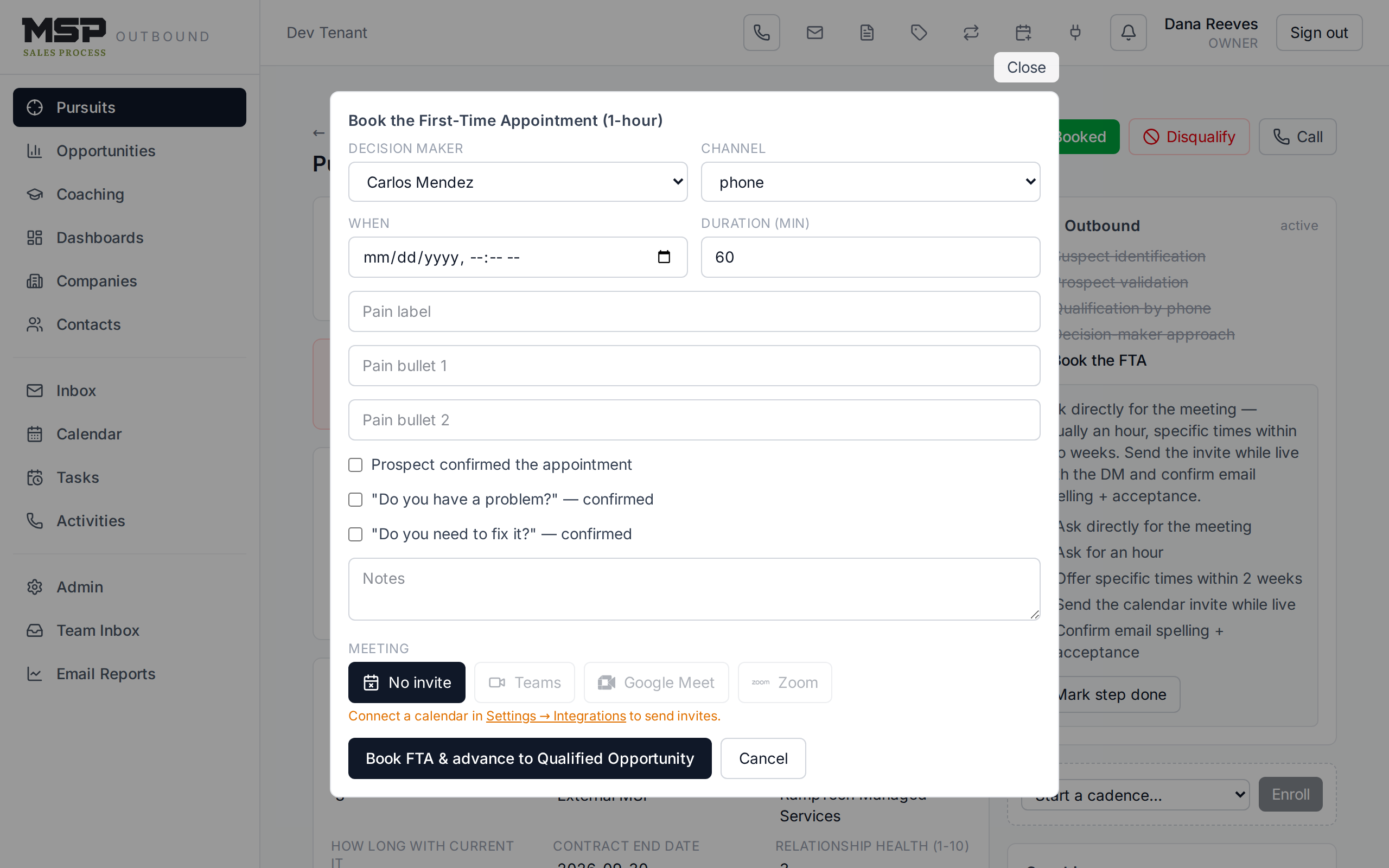
Figure 8.1The FTA form. Each field corresponds to a move in the appointment-setting method.
The method in the tool
Two pain bullets → a label → the prospect confirms → the two-question setup ("Is that a problem?" / "Do you need to fix it?") → a one-hour appointment at a specific time. If you can fill this form truthfully, you booked the appointment the right way. If you can't, that's the tool telling you a step was skipped — never guess the checkboxes to move the record.
Send the invite while you're on the call
The form includes a meeting picker so a Teams (or Google Meet / Zoom) link and a calendar invite go out as part of booking — do this while you're still on the phone, as the method teaches, and confirm the email address before you hang up.
What happens when you click "Book"
The button reads Book FTA & advance to Qualified Opportunity — and that's exactly what it does. In one step the CRM:
- Advances the company to Qualified Opportunity.
- Creates the opportunity (the deal) so the pipeline starts tracking it.
- Carries the pursuit's contacts onto the new deal automatically.
- Enrolls the account in the New Logo Sales Process play, which will guide discovery through close.
- Opens the Discovery tab, ready for what you learn next.
Watch out
This is the only path to Qualified Opportunity — there's no way to set that stage by hand. That's deliberate: the whole method hinges on the appointment being real. If a prospect gives a vague "sure, sometime," you don't have an FTA yet, so don't book one.
If plans change
Reschedules and no-shows happen. The appointment carries a status you can update, and you manage the calendar event like any other (Section 11). A booked-then-cancelled FTA is part of the honest record — handle it cleanly rather than deleting the history.
The bottom line
Fill the form honestly; the climb begins.
The FTA form is the appointment-setting method in miniature. Book it right and the CRM opens the whole deal for you — pipeline, discovery, and the play to run it.